Introduction
In the realm of AI programming tools in 2026, Cursor and Antigravity represent two distinctly different evolutionary paths. The former is the pinnacle of the “gradual improvement” approach based on the VS Code ecosystem, while the latter aims to redefine “human-machine collaborative programming” as a new native agent.
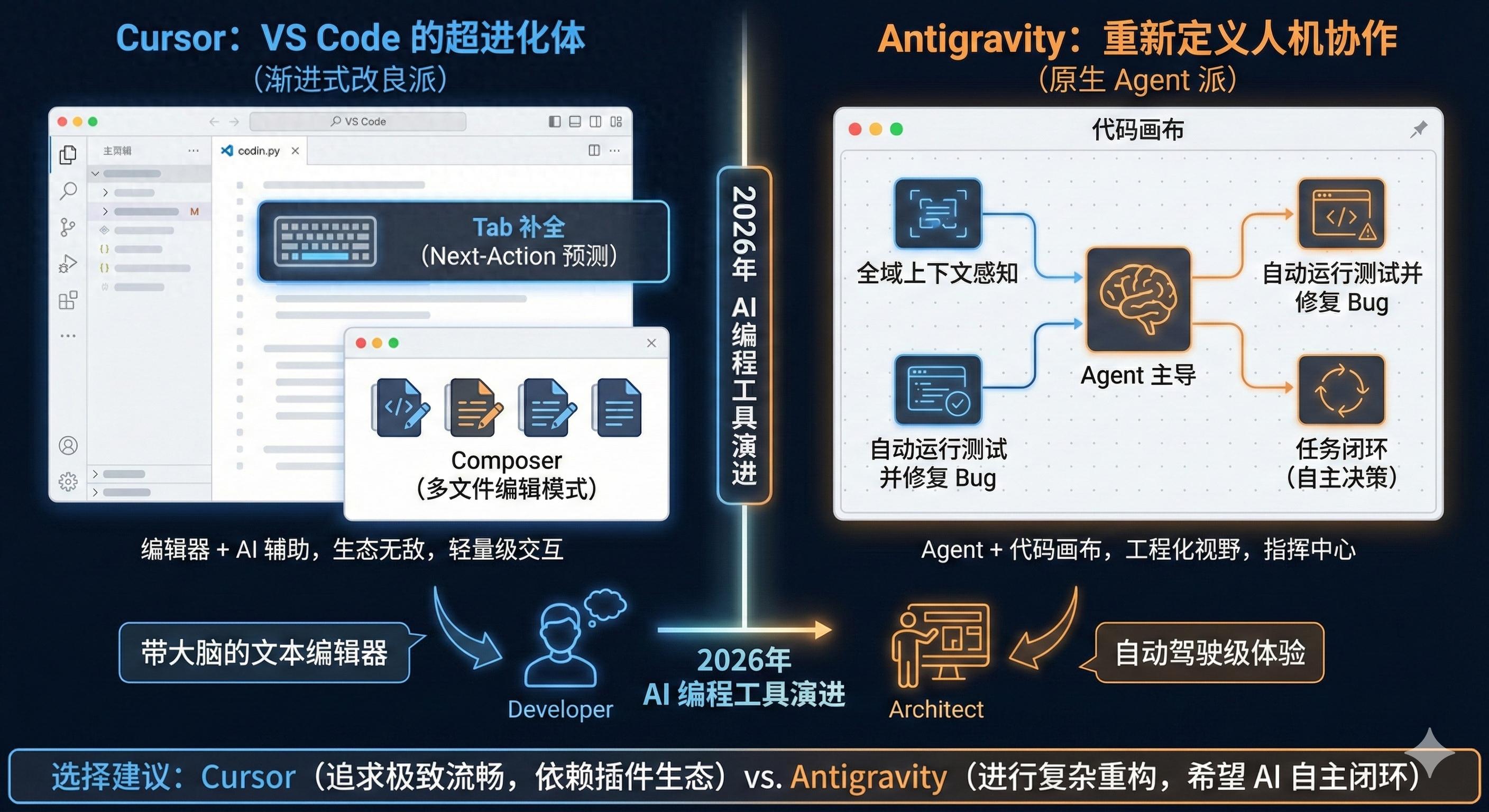
Here is a deep comparative analysis of these two tools:
1. Core Positioning and Architecture
| Feature | Cursor | Antigravity |
|---|---|---|
| Base Architecture | Deeply customized based on VS Code (Fork) | Native AI-driven architecture (not typically VS Code-based) |
| Core Logic | Editor + AI assistance: retains traditional IDE habits | Agent + code canvas: AI is dominant, human is the reviewer |
| Learning Curve | Very low (seamless transition for VS Code users) | Moderate (requires adaptation to a new interaction logic) |
Cursor: The Super Evolution of VS Code
Cursor’s success lies in its perfect inheritance of the VS Code plugin ecosystem, while rewriting the interaction protocol between the editor and LLM at its core. Its “Tab” (Copilot++) prediction feature and Composer (multi-file editing mode) are its killer features, making you feel like you’re using a “brain-powered text editor.”
Antigravity: Born for Agents
Antigravity is often viewed as a more radical experiment. It is not satisfied with merely “patching” existing code but adopts “global context awareness”. Its design philosophy allows the AI to possess a “global vision” similar to that of human developers, understanding deep dependencies in engineering architecture rather than just text-level completions.
2. In-Depth Feature Comparison
A. Coding Autocomplete and Prediction
- Cursor: It has the industry’s strongest Next-Action prediction. When you finish editing a function, it accurately predicts which file you will modify next. Its fine-tuned model performs exceptionally well in handling small logical deviations.
- Antigravity: Focuses more on “intent completion”. It not only completes code but also automatically fills in related unit tests or documentation. Its completions are often “block-based,” with a broader logical span.
B. Multi-file Editing and Agent Mode
- Cursor (Composer): Allows users to describe requirements directly in the Control+I interface, and the AI will modify 5-10 files simultaneously. While powerful, it occasionally experiences “hallucinations” that cause compilation interruptions when handling extremely complex refactoring.
- Antigravity: Its core advantage lies in “task closure”. Antigravity’s agent typically has terminal control and browser tools, enabling it to run code, capture errors, and automatically fix them until tests pass. This offers an “autonomous driving” level of experience.
C. Context Awareness
- Cursor: Relies on .cursorrules and vector indexing (RAG). It excels at indexing local files but may occasionally miss semantic meanings of remote dependencies when handling large monorepos.
- Antigravity: Employs a technology similar to “infinite context windows” or “knowledge graphs”. Its understanding of the codebase is not just search-based but constructs a real-time logical tree, often achieving higher accuracy than Cursor when handling cross-module decoupling tasks.
3. User Experience and Interaction (UX)
- Cursor: Features a typical editor interface with sidebar chat and floating input boxes. Its interaction is very “light” and does not interrupt your thought flow.
- Antigravity: Introduces more concepts of “visual canvases”. You might see task progress bars and mind map-like code logic flows. It resembles a “command center” where you, as the architect, issue commands.
4. Summary of Pros and Cons
Cursor
Pros:
- Unmatched ecosystem; all VS Code plugins are usable.
- Extremely fast response; Tab completion is nearly instantaneous.
- Composer mode greatly enhances the efficiency of small refactoring.
Cons:
- Still limited by the VS Code architecture, making it hard to achieve true “fully autonomous agents.”
- Highly dependent on prompts when dealing with extremely complex business logic.
Antigravity
Pros:
- High autonomy: Can run tests and fix bugs independently.
- Engineering vision: More suitable for handling architectural level changes.
- Native integration: Unconstrained by old IDE frameworks, interactions are more aligned with the AI era.
Cons:
- Ecosystem is in its early stages; fewer plugins and themes available.
- Resource consumption is generally higher than Cursor (due to the background agent logic).
5. Decision Recommendations: Which One Should You Choose?
-
Choose Cursor if:
- You are a full-stack or front-end developer who frequently handles various frameworks and UI.
- You rely on numerous VS Code plugins (like Docker, GitLens, specific language packs).
- You seek an ultimate smooth experience, wanting AI to assist you like a shadow.
-
Choose Antigravity if:
- You are engaged in complex system refactoring or foundational architecture design.
- You want AI to take on more “tedious repetitive tasks” (like writing tests, running CI, fixing low-level bugs).
- You are willing to try non-traditional IDE interactions, pursuing the ultimate efficiency of “one sentence generating a functional module.”
Comments
Discussion is powered by Giscus (GitHub Discussions). Add
repo,repoID,category, andcategoryIDunder[params.comments.giscus]inhugo.tomlusing the values from the Giscus setup tool.